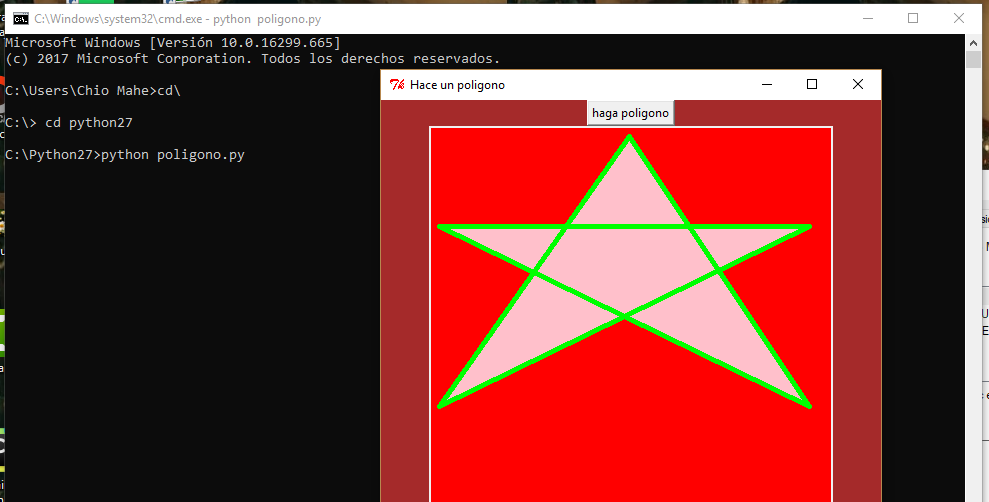
PRACTICA 37: SUMA CON WHILE

Sin método:


numeroin =50
suma= 0


while numeroin >= 1:
    suma= suma + numeroin
    numeroin= numeroin - 2
    print 'numero ----> ', numeroin
    print '(suma)', suma


Con método:


def sumareg (numeroin, numerofin):


 suma= 0


 while numeroin >= numerofin:
           suma= suma + numeroin
           numeroin= numeroin - 2
           print 'numero ----> ', numeroin
           print '(suma)', suma

numeroin = int(input('NUMERO INICIAL: '))
numerofin = int(input('NUMERO FINAL: '))
sumareg(numeroin, numerofin)

PRACTICA 36: NUMERO IMPAR UTILIZANDO IF Y FOR

def sacaimpar(numeroin, numerofin):
    i= numeroin
    for i  in range(numeroin, numerofin):
        residuo= numeroin %2
        if residuo !=0:
           print ('EL NUMERO ES impar', numeroin)
        else:
            print 'el numero es par', numeroin
        numeroin=numeroin+1


numeroin= int(input(' DAME EL NUMERO INICIAL: '))
numerofin= int (input('Hasta que numero saber impar: '))
sacaimpar(numeroin, numerofin)

PRACTICA 35: EJEMPLO DE AMBROCIO (MENU DE OPCIONES)


import math

def calculo():
    opc=0
    print 'MENU DE OPCIONES'
    print 'SELECCION LA OPCION'
    print '1. DETERMINAR SI EL NUMERO ES PAR'
    print '2. SACAR SENO Y COSENO DE 2 NUMEROS'
    print '3. SACAR LOGARITMO DE UN NUMERO'
    print '4. SALIR'
    opc= int (input('OPCION: '))

    if opc== 1:
        print 'INGRESE VALOR: '
        valor = int(input())
        residuo = valor %2
        if residuo ==0:
            print 'EL NUMERO ES PAR'
        else:
            print 'EL NUMERO ES IMPAR'


    elif opc == 2:
        valor1= int(input('\n DAME EL PRIMER VALOR: '))
        valor2= int(input('\n DAME EL SEGUNDO VALOR: '))
        sen1= math.sin(valor1)
        sen2= math.sin(valor2)
        cos1= math.cos(valor1)
        cos2= math.cos(valor2)
        print '\nSENO DEL VALOR 1: ', sen1
        print '\nSENO DEL VALOR 2: ', sen2
        print '\nCOS DEL VALOR 1: ', cos1
        print '\nCOS DEL VALOR 2: ', cos2

    elif opc == 3:
        valor1 =int(input('INGRESE UN VALOR PARA EL LOGARITMO: '))
        log = math.log10(valor1)
        print '\nLOGARITMO DEL VALOR 1: ', log

calculo()

PRACTICA 34


3. PROGRAMA QUE NOS DICE SI UN NUMERO ES MAYOR O MENOR


import time

h= input('INGRESE UN VALOR')
time.sleep(2)

if h == '5':
    print 'ES MENOR'

else:
    print 'ES MAYOR'

PRACTICA 33

2. PROGRAMA QUE AL INGRESAR DOS CONTRASEÑAS Y MEDIANTE IF ANIDADOS NOS DICE SI TENEMOS ACCESO.

NOTA: Si nosotros ponemos una de las dos contraseñas mal, inmediatamente nos negara el acceso.


from math import *
import time

print 'NOMBRE'
nom= raw_input()


print  'PASSWORD'
passw= raw_input()

print 'PASSWORD ALTERNATIVA'
pal= raw_input()


print 'CARGANDO PASSWORD'
time.sleep(1)
print ('--------------')
time.sleep(1)
print ('--------------')
time.sleep(1)
print ('--------------')
time.sleep(1)
print ('--------------')
time.sleep(1)
print 'CARGA COMPLETA 100%'


if passw== '1868':
    print 'TIENE ACCESO'
elif passw != '1868':
    print 'ACCESO DENEGADO'
elif pal== '1997':
    print 'CLAVE ALTERNATIVA INGRESADA'
elif pal!= '1997':
    print 'ACCESO DENEGADO'
else:
    print 'VUELVA A REINTENTARLO'

PRACTICA 32

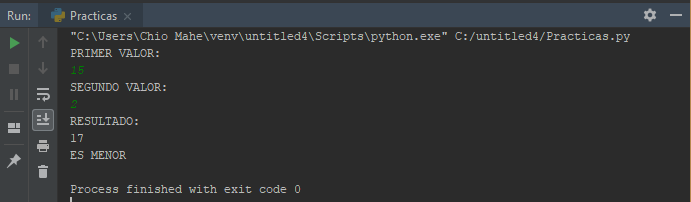
1. PROGRAMA QUE SUMA DOS NUMEROS Y COMPRUEBA SI ES MAYOR O MENOR EL RESULTADO


from math import *
print 'PRIMER VALOR: '
x= int (input(''))

print 'SEGUNDO VALOR: '
y= int (input(''))


SUMA= x+y
print 'RESULTADO: '
print (SUMA)

if SUMA >= 50:
    print 'ES MAYOR'
else:
    print 'ES MENOR'


PRÁCTICAS: 19/09/2018

La función ceil(x)devolverá el entero más pequeño que sea mayor qué o igual a x.


PRÁCTICA 26: SUMA DE DOS NUMEROS

import time
from math import *


print 'ingresa un primer valor: '
a=int (input(""))

time.sleep(5)

print 'ingresa un segundo valor: '
b=int (input(""))

suma= a+b
print "Suma de los valores ingresados:"
print(suma)


PRÁCTICA 27: FACTORIAL DE UN NUMERO


import  math

a=5

print math.factorial(a)
print math.ceil(a)


PRÁCTICA 28: PROGRAMA QUE VERIFICA SI ES ADMINISTRADOR O NO


import time

print "ingrese su nombre"

nombre=raw_input()


if nombre== 'Chio':
    print ('es usted administrador')
else:
    print ('no tiene acceso')


PRÁCTICA 29: PROGRAMA QUE VERIFICA SI ES ADMINISTRADOR UTILIZANDO LA LIBRERIA TIME


import time

print ('nombre')
nombre= raw_input()
print ('cargando password')
time.sleep(1)
print('***')
time.sleep(2)
print('***')
time.sleep(3)
print('***')
time.sleep(4)
print('***')
time.sleep(5)
print('Carga completa 100%')

if nombre == 'Chio':
    print('Es usted administrador')
else:
    print('no tiene acceso')


PRÁCTICA 30: PROGRAMA QUE VERIFICA SI UN NUMERO ES PAR O IMPAR

h=input('Introduzca un numero')
if h%2 == 0:
    print  'Este numero es par'
else:
    print 'Este numero es impar'


PRÁCTICA 31: PROGRAMA QUE REALIZA LA CONVERSIÓN DE DECIMAL A BINARIO

import time

print 'programa de conversion decimal a binario'
print 'numero a convertir'
time.sleep(2)
a=input()
b=bin(a)
print (b)
time.sleep(3)


*VISUALIZACIÓN DE CÓDIGO MEJORADA*

from Tkinter import *
root = Tk()
root.title('formulario 1')
# row 1 : thenombre_label = Label(root,text="Nombre :")
nombre_label.grid(row=1,column=1)
nombre_str = StringVar()
nombre_entry = Entry(root,textvariable=nombre_str)
nombre_entry.grid(row=1,column=2)
#row 2 : the lastlast_label= Label(root,text="Apellido : ")
last_label.grid(row=2,column=1)
last_str = StringVar()
last_entry = Entry(root,textvariable=last_str)
last_entry.grid(row=2,column=2)
#row 3 : themail_label = Label(root,text="Email : ")
mail_label.grid(row=3,column=1)
mail_str = StringVar()
mail_entry = Entry(root,textvariable=mail_str)
mail_entry.grid(row=3,column=2)
#row 4 :endfinish = Button(root,text="finalizar",relief=FLAT)
endfinish.grid(row=4,column=2)
root.mainloop()

PRACTICA 25: CREANDO UN POLIGONO EN PYCHARM (PENTAGONO)

PRESENTACIÓN DE CÓDIGO EN PYCHARM


EJECUCIÓN DEL CÓDIGO


from Tkinter import *

ventana=Tk() #hago un objeto ventana
ventana.title('Hace un pentagono')#pongo titulo a mi ventana
ventana.config(bg='gray')
ventana.geometry('500x500')

def poligono(ventana):
    panel = Canvas(width = 500, height = 400, bg='white')
    panel.pack()
    panel.create_polygon(140, 40, 300, 40, 400, 140, 40, 140,  width = 5, fill= 'white', outline = 'black' )
    #coordenadas y caracteristica de la figura

boton1 = Button(ventana, text = 'haga poligono', command = lambda:poligono(ventana))
boton1.pack()

ventana.mainloop()


PRACTICA 24: DIBUJANDO CON EL MOUSE EN PYTHON


from Tkinter import *

canvas_width= 500
canvas_height= 150


def paint(event):
    x1, y1 =(event.x-1), (event.y-1)
    x2, y2 =(event.x+1), (event.y+1)
    panel.create_oval(x1, y1, x2, y2, fill= 'red')

def clearall():
    panel.delete('all')


master=Tk()
master.title('pinta con el mouse')
panel = Canvas(master, width=canvas_width, height=canvas_height)
panel.pack(expand=YES, fill= BOTH)
panel.bind('', paint)

mensaje= Label(master, text= 'Presione o arrastre con el mouse')
mensaje.pack(side=BOTTOM)

boton= Button(master, text='Borrar', command= clearall)
boton.pack(side= BOTTOM)

master.mainloop()


PRACTICA 21: CREAR POLIGONO CON NOTEPAD ++

Escribir el código en Notepad ++


Guardar en Python27 con la extensión .py


Para ejecutar el programa desde consola acudiremos al simbolo de sistema y enseguida lo buscaremos como: python poligono.py


PRACTICA 23: CREANDO UN CANVAS CON UNA IMAGEN EN PYCHARM


from Tkinter import *

v=Tk()
v.geometry("500x500")
v.title("Visualizacion")

i=PhotoImage(file="anigif.gif")

f = Label(v,image=i).place(x=0,y=0)
v.mainloop()


PRACTICA 22: CREAR UN GIF CON PHOTOSCAPE

Ir a la sección de GifAnimation de PhotoScape


Arrastramos las imagenes


Guardamos y visualizamos